About the Project
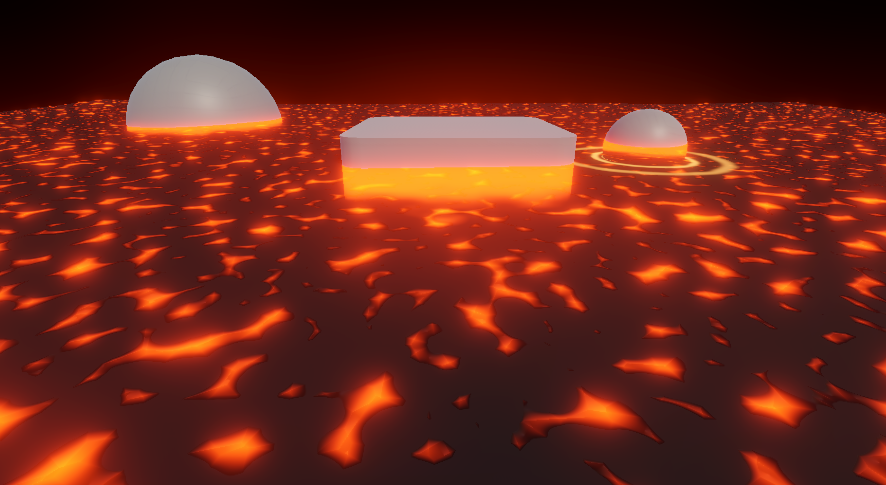
It is a highly customizable asset pack that helps users create stylized reactive surfaces like lava. When an object collides with the surface, a ripper particle effect is spawned and the object starts dissolving into ashes. There are two types of ripple effects (particle systems), one spritesheet based ash particle effect, the main lava shadergraph, a dissolve shadergraph with a toggle that lets you choose when you want to trigger the dissolve effect and an example script that lets you see how the multiple effects inside can be used together.
Some of these effects were used in my game “The Adventures of Captain Smartypants”.
Development
This effect is procedural and uses voronoi and simple noise to create a wave effect.
Some Technical Details:
- The lava shader is fully procedural with exposed properties that let users change the materials created according to their requirement. A few material presets are provided in the pack as examples of what can be achieved with the shader.
- There is vertex displacement in the shader. The more subdivisions your plane has, the smoother the waves look.
- The scene depth node was used to calculate the foam around the immersed objects. Make sure that depth texture is enabled in URP settings.
- The dissolve effect has a toggle for when the user wants to use it as a normal material and when they want to use it as a dissolving material.
- The example script makes use of unityevents in case the user is not comfortable with writing scripts and wants the effects to work right out of the box. They can add any amount of events via the inspector for on trigger and on collision with the surface.
Challenges
One of the biggest challenges with making this assetpack was the documentation. It was hard to strike a balance between providing enough details and keeping it user friendly (an instruction manual worth several pages was only going to be skipped, after all). In the end I added several images and put up the information in bullet points so that it was easier for the user to navigate the document.
The lava shadergraph that I created doesn’t make use of a texture map or normal map. Everything is generated procedurally via noise. The noise created seem less random when tiled too high. One way to make this seem natural was to add multiple layers of noise maps and blend between them. However, too many layers would end up dealing a heavy blow to the performance. I ended up not using gradient noise as it is more performance heavy than voronoi or simple noise. The shader currently uses voronoi and simple noise layered together.